USB Flash RAW Recovery - a complete solution you cannot miss
Summary:
This is the all-in-one guide that you may need if you are just in the trouble of getting a usb thumb drive that suddenly became raw format, 0 bytes, not formatting, reported chkdsk is not available for raw drives or just showed blank. This tutorial can help rescue files if they are of importance to you, and a guide to fix the raw drive error with free tools or cmd diskpart.
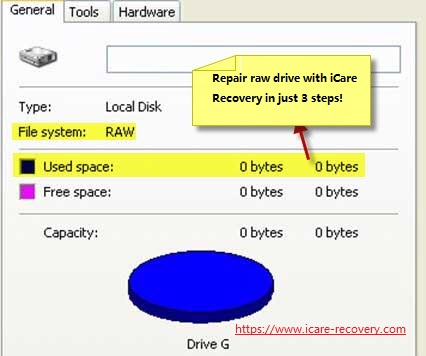
Is your thumb drive showing file system RAW? Here is a photo that would show exactly the same one under 'Property' when you right click the raw flash drive under its property in term of General.
It indicates that the used space is 0 bytes, free space 0 bytes together with capacity in 0 bytes too while you have got probably tons of data inside that you used this flash stick to save files.
 usb flash file sytem raw unreadable
RAW USB Drive Recovery - the complete guide
- Symptoms of raw flash drive problem
- Why flash drive turned RAW file system
- Recover files from usb raw using Recuva
- Recovering files from raw pendrive using iCare Pro Free
- Professional paid flash drive raw recovery tool - paid tool, efficient
- What is file system raw, ntfs, fat32, exfat, hfs
- Recover raw usb flash using cmd
- Convert usb raw to fat32/ntfs with formatter or disk management
- Conclusion
Symptoms of usb flash drive raw error
Here are some photos that would popup if you try to open your usb drive when your thumb drive is raw.
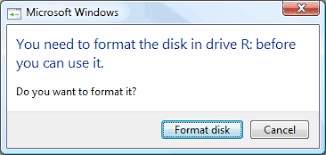 Flash drive raw needs formatting when you try to access the drive. It warns 'You need to format the disk in drive R: before you can use it. Do you want to format it?' in Windows 10
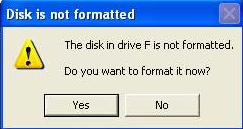 And flash drive raw file system would look like this popup photo if you are with Windows XP OS. flash drive reports message like "The disk in drive is not formatted do you want to format it now"?
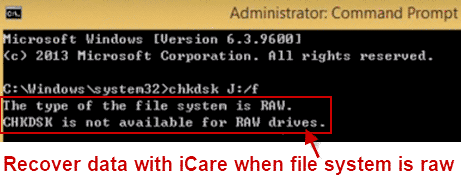 When you do chkdsk trying to repair the thumb drive by using chkdsk J:/f, it would respond a message: The type of file system is raw. CHKDSK is not available for RAW drives.
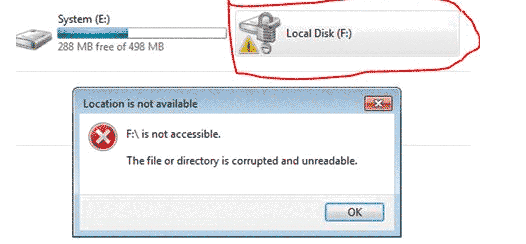 When location is not available message showed up when you want to open your usb drive, it would say: F:\ is not accessible. The file or directory is corrupted and unreadable.
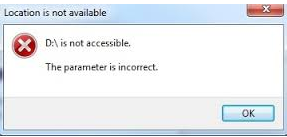 Location is not available for raw usb drive. D:\ is not accessible. The parameter is incorrect on flash drive.
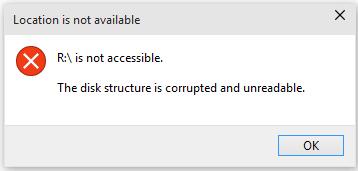 Location is not available for raw usb drive. R:\ is not accessible. The disk structure is corrupted and unreadable.
Why Usb Thumb drive Turned RAW in file system suddenly
There are many chances that your usb stick may get corrupted and become file system RAW, including
- bad blocks occurred after using thumb stick for a while, and it may happen anytime without any sign.
- damaged MBR (master boot record)
- virus attack, when your flash drive was connected to PC, the virus on computer would get it affected too.
- damaged MFT (MASTER FILE ALLOCATION TABLE), the one that records where your data stored on your usb drive.
- sudden electric power of failure, or just a power surge may get the usb drive damaged
- removed the thumb drive directly without safe removal mode
- formatting failure by disk management or any third party formatting utilities
- other unknown causes
Once your flash drive is raw, it usually comes up with 0 bytes in space and would be mostly inaccessible at the same time.
Do not try to repair or chkdsk the damaged usb drive to keep the best chance of data recovery from the raw drive.
Free Tools for Recovering Data from RAW Flash Drive
Tool#1: Recover raw flash drive with iCare Pro Free 
Free USB Flash Drive Raw Recovery

Download iCare Data Recovery Pro Free to recover files from raw usb flash/thumb drive including photos, videos, music...
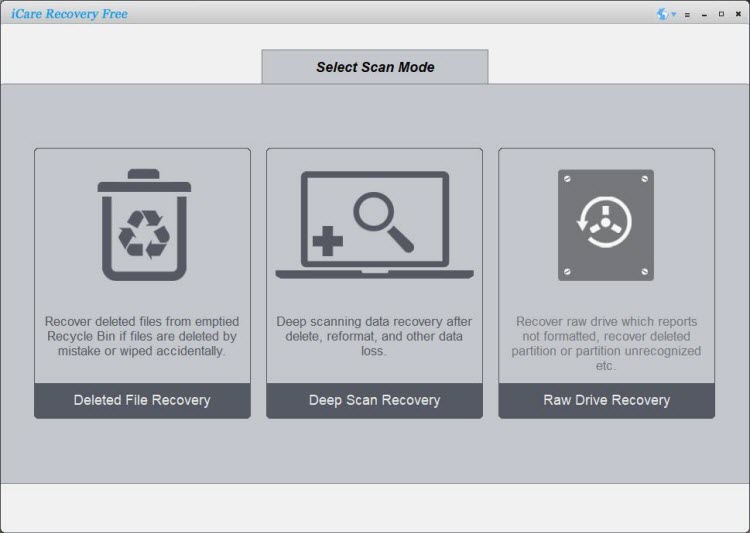
Step1. Plug the RAW flash drive to the PC where has installed the software. Start the program and select a mode for scanning. Choose 'Deep Scan Recovery' for raw flash drive recovery.
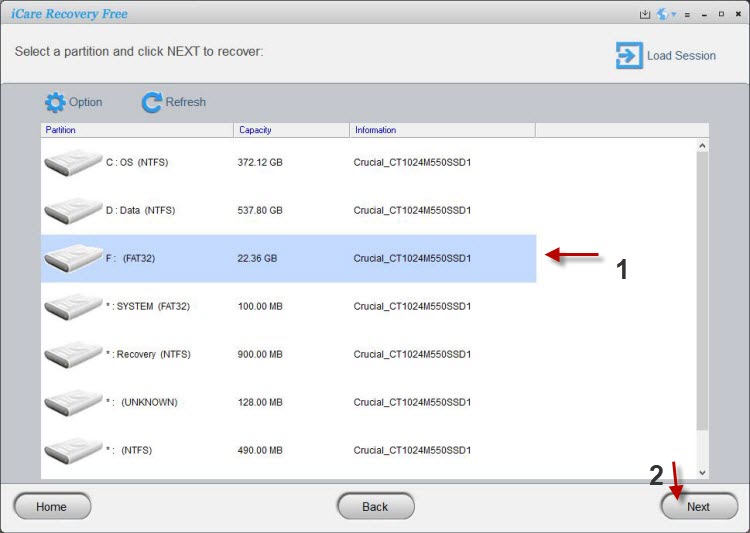
Step2. Wait the software to scan the RAW thumb drive.
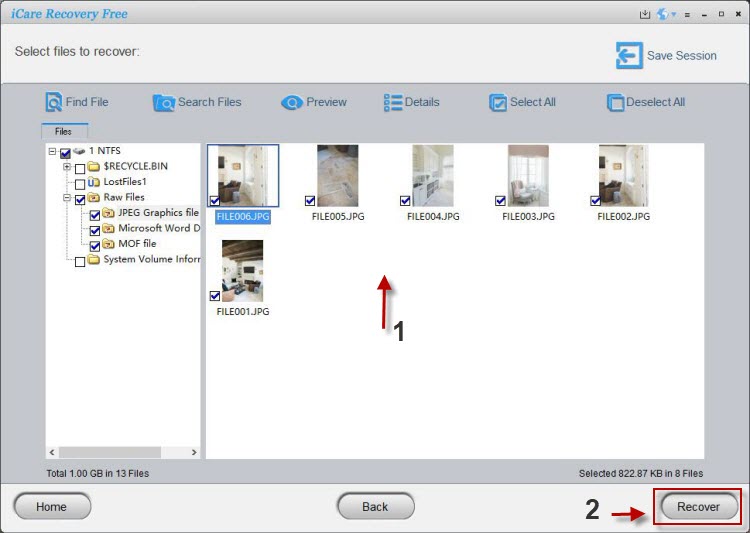
Step3. Select files found by the software to scan and then restore them.
Tool#2: Recover files from raw flash drive with Recuva -free
Recuva is a decent freeware for recovering data from raw thumb drive and it is complete free of charge. There is also a paid version which is entitled for business use with the same functions. Free edition is for good and enough for you.
Here are the download links
Steps for using Recuva
Tool#3: Recover raw usb using professional raw drive recovery tool
This is a commercial yet professional tool that is efficient in recovering files from your raw pen drive.
Here in solution, we have tested a program - Stellar Data Recovery, which can find almost all your files from the raw pen drive. It only asks for a code when it could find data for you.
Here are the steps for using the program that is built with user friendly interface.
Step 1: Get your raw pen drive on PC/MAC and then select file types you need to recover from your pen drive.
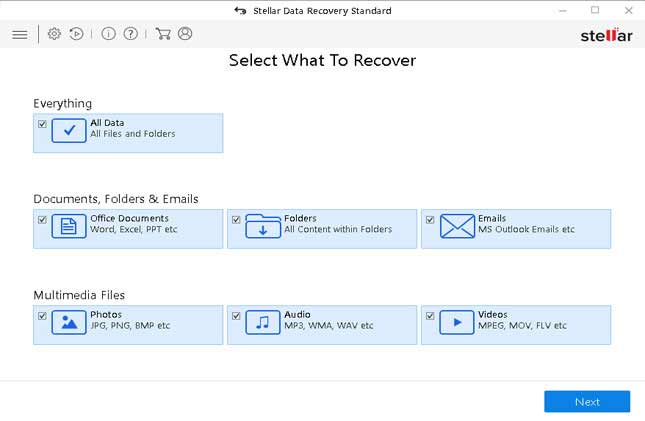
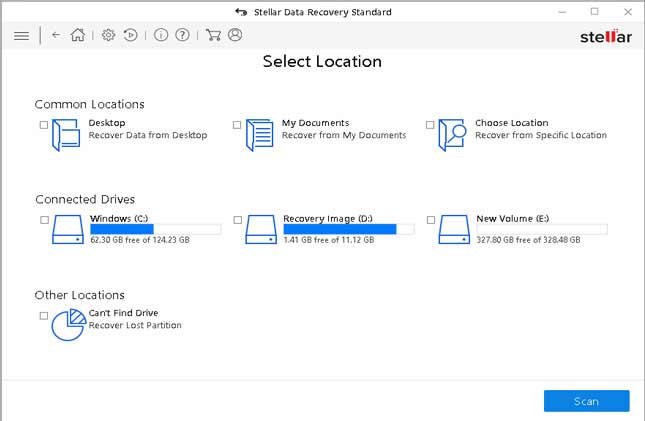
Step 2: Select your usb device
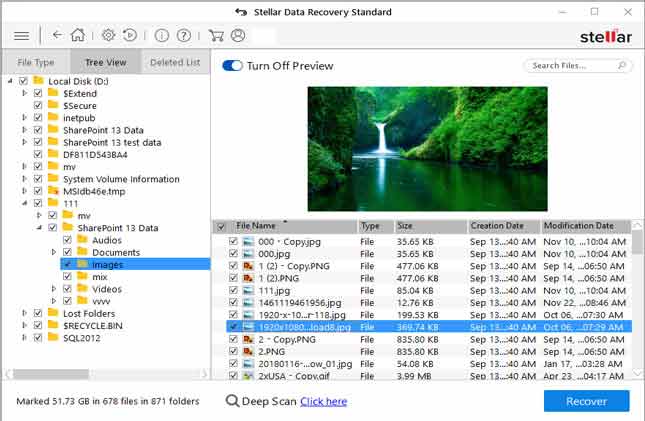
Step 3: Preview found data
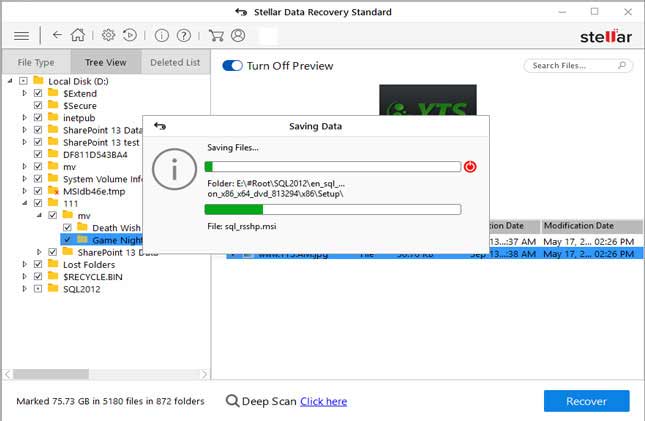
Step 4: It's better to save raw drive files to another device to keep the raw flash drive untouched even during the recovery process.
Part 2: Recover RAW USB with cmd diskpart (Format raw usb to fat32/ntfs using cmd)
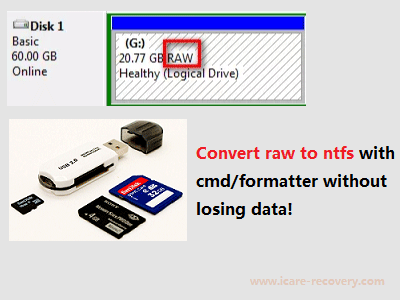 flash drive raw to ntfs/fat32
You can only do this converting when the important data was successfully restored to somewhere else, or any change of the flash drive would kind of risky to lose data on the usb.
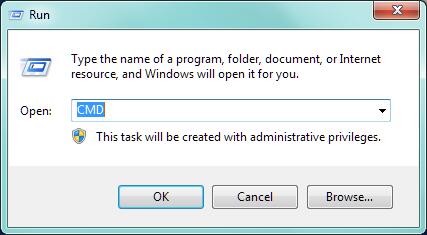
Open cmd by the following route: Press Windows+R to open 'Run' box. Type 'cmd'
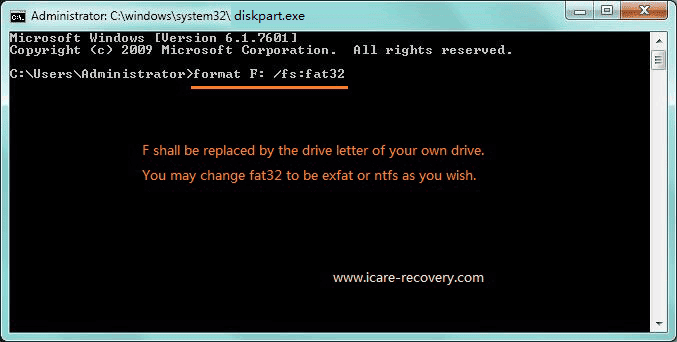
CMD > diskpart > format X: /fs:ntfs
Or the following as option
CMD > type list disk > type select disk < type list volume > type format fs=ntfs label=volume label quick (or type convert x: /fs:ntfs, x: refers to the drive letter of the RAW partition)
If the above cmd does not work, try these following steps instead
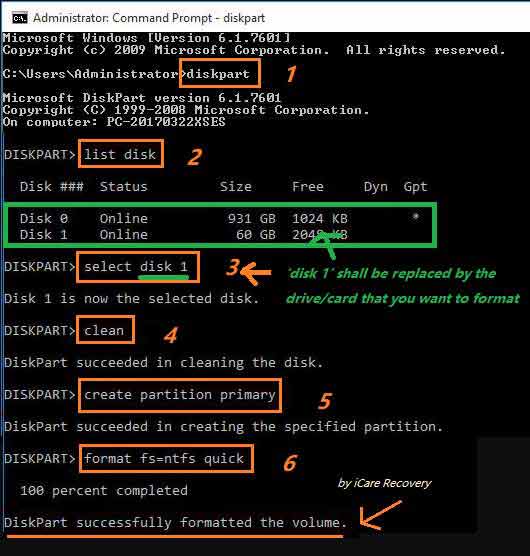 Format usb that cannot be formatted
If you want to know more about how to format raw to fat32, be free to read this guide: Top free ways to format raw to fat32
Video Guide: repair raw file system error
Format pen drive raw to fat32/ntfs by Disk Management or Windows formatter
The term RAW is basically used for accessing the data from disk storage, hard drive or some other kind of media instead of some proper file system. You can not get access on files on the raw disk and if you try to access the files you will often get a message such as "disk is not formatted" and then it will provide you two options that whether you want to format the disk or not.
Here, you can format pen drive to change RAW drive to FAT32 by right click the pen stick or format it under disk management after data recovered from the raw pendrive by iCare Pro.
Format option 1: format it by right click the media, and select format option
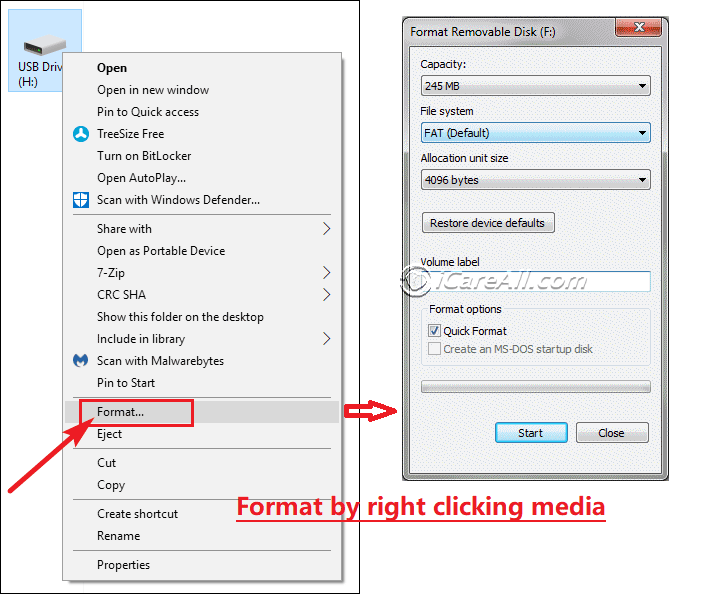 format usb pen drive
Format option 2: format pen memory stick by function under 'disk management'
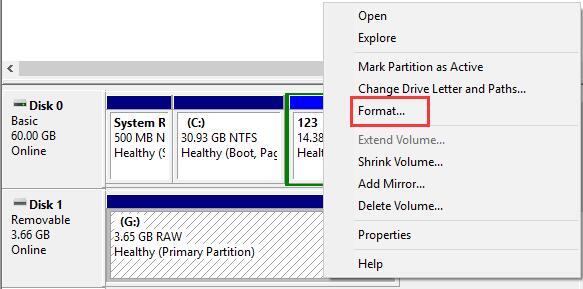 format usb pen drive under disk management
Video: how to fix raw pen drive
Other useful links
 => To know more about how to fix RAW error, please refer to: complete guide for RAW drive fix
Question: Can I Format My RAW Flash PenDrive without losing data?
Is it safe to format the RAW USB flash drive for RAW file system fixing? Technically speaking, you should try to avoid formatting it when there are a lot of files inside. You need to recover data from the raw usb at first and then get it fixed later.
Windows Says USB Flash Drive Is Not Able to Be Formatted
The only way to format a USB flash drive is to connect it to a computer that can recognize it.
=> If USB thumb drive cannot be formatted by Windows, please go to this article: Windows was unable to complete format
What is file system RAW, NTFS, FAT32, EXFAT, HFS
Flash drive, namely USB flash drive, pen drive or thumb drive, appeals to many people due to its small size with large capacity.
Since you are now with a raw pen drive, we would like to share some basic computing knowledge with you regarding to the file system on storage media.
NTFS/FAT32: It is set to be ntfs/fat32 when you firstly receive your flash drive from factory, resellers, online stores, or local digital shops and the early state of usb flash drive has been formatted from RAW to ntfs/fat32 by factory.
So it's already good for storing data that you don't have to do anything else about its formatting or file system.
File System RAW: it is the state in factory during producing the flash drive when it is first made inside of factory and then later the factory would operate a low level of formatting to make its file system raw to Windows easily recognized file system: ntfs, fat32, exfat or more.
File System NTFS, exfat, fat32 are Windows acceptable file system for digital storage devices according to different capacity, abilities, time of speed, block size and age of popular settings.
File system hfs is a Mac file system that is acceptable under the MAC OS, ie iOS.
FAQs
Write New Files on Flash Drive After Formatting?
If you did this, I'm afraid the files on the flash drive will be corrupted because of overwriting, and they cannot be recovered by any recovery software. You are strongly suggested that do not input new data on your flash drive after formatting the drive.
Retrieve raw flash drive files - is data that important?
Getting into the resolution of these road blocks can lead users in a catastrophic direction in which files and folders will be lost forever. With raw drive recovery software, however, you don't need to worry about losing files. Not only does the software work with multiple components of all installed hardware on Windows to guide you step-by-step in avoiding disaster; it also offers a comprehensive rescue capability to retrieve lost files due to premature formatting, network failure, loss of power, failed partitions, and much, much more.
Last updated on Nov 28, 2023
Related Articles