RAW Drive Recovery - Fix RAW Partition without losing data
Summary
If your digital device like external hard drive, usb flash or sd memory card suddenly became raw and asked reformatting, don't worry, download this raw drive recovery utility to repair raw file system and use raw partition explorer iCare Recovery Pro which only takes 3 easy steps to get out of the RAW hassles!
What is raw file system and how to repair raw drive in Windows 11/10/8/7

When I connect my USB flash drive to my computer, it warns the file system type raw is not supported, the drive is not formatted do you want to format it now? and also chkdsk reports not available for raw drives. There are some very very important files inside and I do not want to reformat it. What should I do to recover the raw usb drive? The file system is RAW and used space 0 bytes, how to fix it?
Tonny, a User
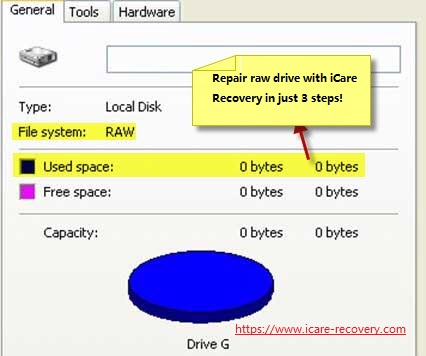 Raw drive property: file sytem is raw
If your sd/disk or pen drive turned RAW file system, you are on the right corner for getting a solution to fix the file system type RAW when it is not supported and recognized by Windows.
The RAW error problem is a common situation that often happens on removable usb disk, sd memory card, flash drive etc. The reasons vary from virus affection, unsafe removal, unexpected power outage, or it may just come out to you from no where.
What's included
How Do I View a Raw File System - 3 Steps to Open a raw Partition
Step1. Download iCare Data Recovery Pro , the raw file system reader which will help explore data inside of the raw partition/device, Connect your raw disk drive or card to PC and Start iCare Data Recovery - Select ' ' in iCare. (if it is an sd card, connect raw sd to PC with a at first.)
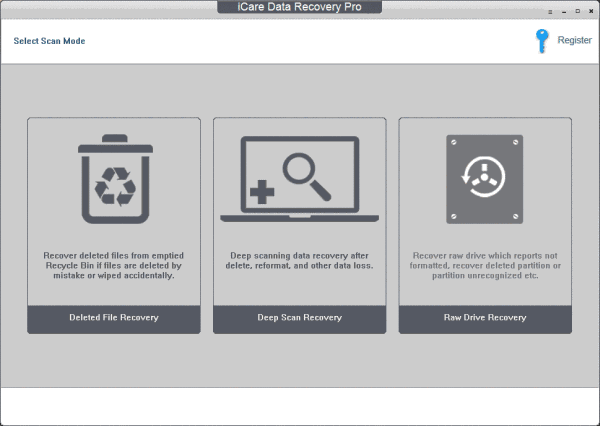 Select "Deep Scan Recovery" or 'RAW Drive Recovery' both work for raw storage media
Step 2: Wait while iCare Data Recovery is scanning your raw digital storage media, and it could take a few hours to finish if your disk is over 1TB, while usually 20 minutes for a 256GB usb flash drive. Note: Time consuming depends on how damage your disk suffered. It may take longer time like hours if your device is badly damaged.
 Choose drive that has raw file system
Step 3: Save data onto a new place.
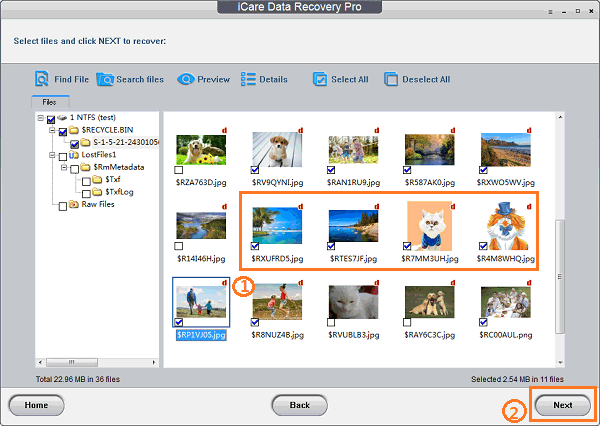 Recover data from raw drive
Part #2. Convert raw drive ntfs/fat32/exfat using cmd
First, you can try command prompt to fix your raw drive. This is a solution you can try without any other tool. You can follow the instructions below.
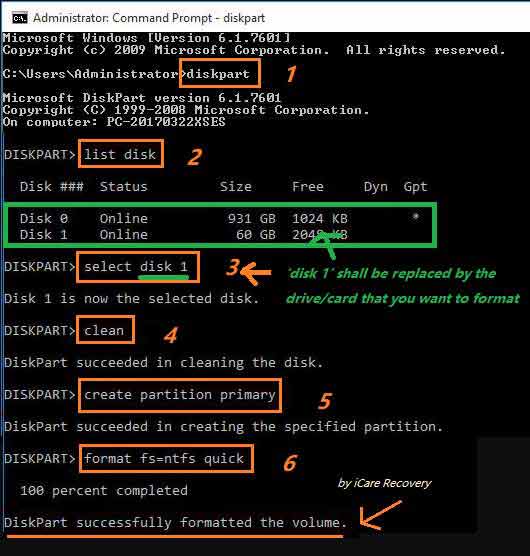 Change raw to ntfs with CMD
Run CMD with admin mode.
1. type “diskpart” on the command box
2. type “ list disk” after “DISKPART” and enter
3. type “select disk 2” and enter.
4. type “clean”. Wait for a minute.
After these steps, then you can convert raw drive to ntfs/fat32, the most commonly used file system for digital devices.
If you want to convert its file system to fat32, you may go through the following steps.
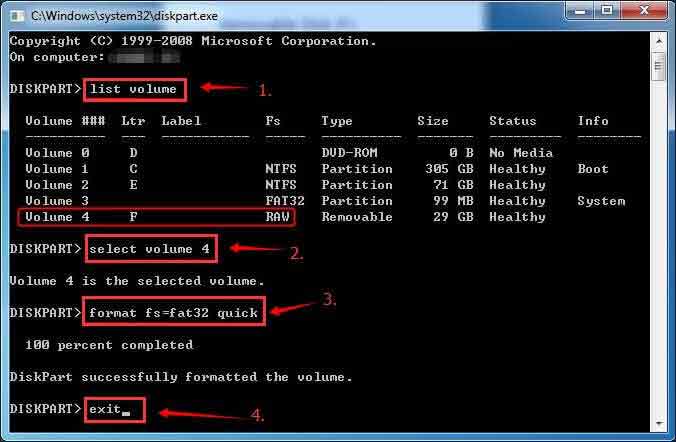 Change raw to fat32 with CMD
Part #3 - Steps to format the raw drive with free raw usb format tool
(When data has already been recovered to somewhere else) You may wonder whether you could convert raw file system to ntfs without formatting, don't worry, when you have saved the data onto a safe place, it is totally safe to convert raw to ntfs. Plus you should know formatting is a must for changing the raw to any other file system.
Part A: format raw drive with cmd
CMD command prompt is a Windows system tool to perform a lot of operations on your system.
Step1: Run CMD.
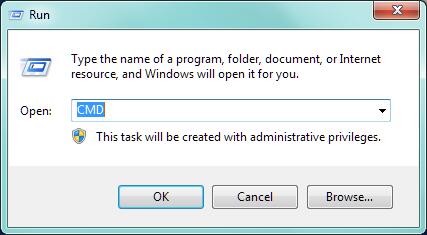 Change raw to ntfs with CMD
Step2: Type“format X: /fs:fat32”(X is the drive letter of your raw hard drive)
You can also convert raw file system to NTFS, and the command line should be the following,
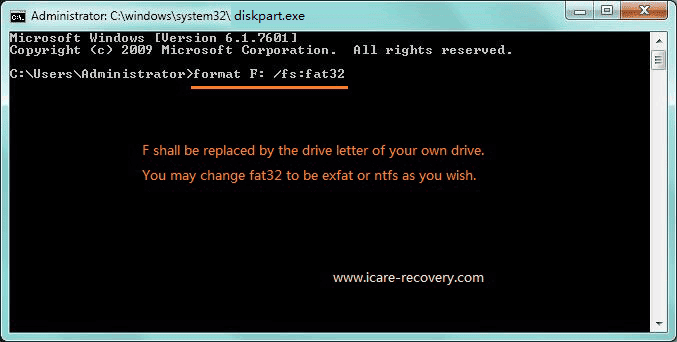 Change raw to fat32 with CMD
Then your digital device is a working one now after the above three steps.
Part B: Format raw usb drive with free usb Format tool
When you need a free usb format tool that could let you format the raw drive, here are several options for you and we will only introduce some most powerful usb format tool to you.
1, Freeware - Partition Resizer Free by IM-Magic
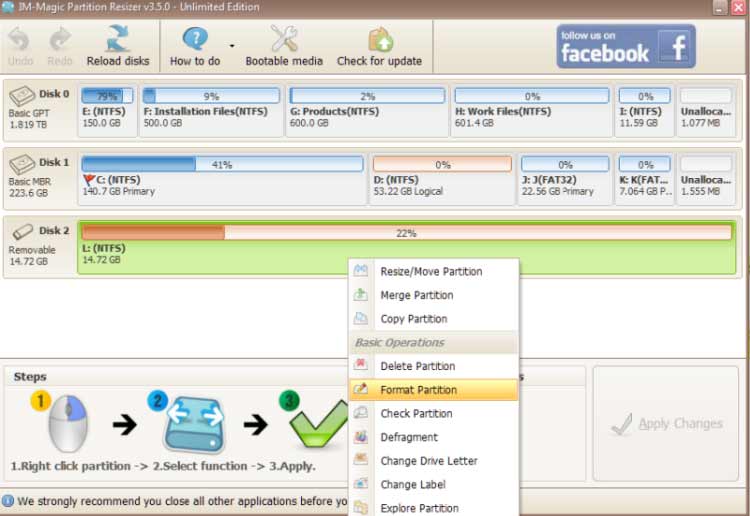 Open partition resizer and right click the raw drive to format
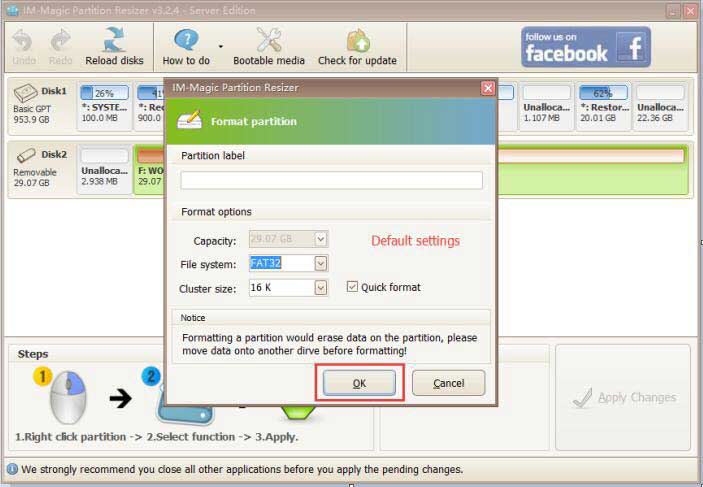 Change raw to ntfs/fat32 with free raw formatter
2, USB Disk Storage format tool
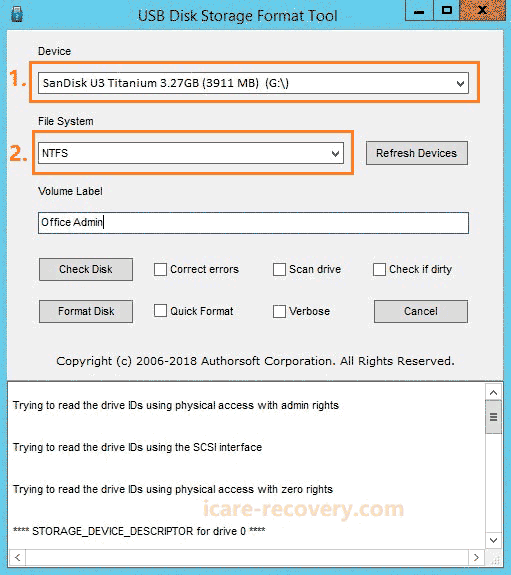
 More raw usb format tool? --> Read more here: free usb format tool
This article also tells more knowledge about raw drive
Table of Contents
Definition - What Is RAW File System in Windows 10 8 7?
RAW drive, also called RAW file system, is a system error that makes your partition RAW and you may no longer access files there without some recovery tool. RAW is a file system that cannot be recognized by Windows no matter in Windows 10 nor Windows 7.
Generally speaking, raw is not used, unexplored status for generally. However the problem raw here is not a nature of digital devices that is new, since it occurred on used storage devices which are not supposed to became raw again without human intentionally conversion. The nature of used digital device should be ntfs, fat32, exfat or hfs... which is commonly used by produced digital devices when they are for use after they became available on the market.
Symptoms
The symptom of RAW drive is that it is often not accessible. When a digital device turns to RAW file system, it may show following messages:
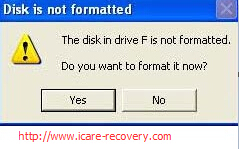
1. Windows pops up error message saying "disk in drive is not formatted do you want to format it now" when you click the RAW drive to open it.
2. Check the Properties of RAW drive shows 0 bytes in used space, free space and capacity.
The file system changes to RAW format.
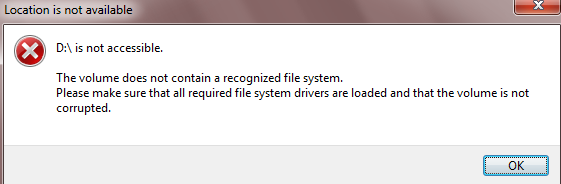
3. It reports disk drive is not accessible when attempting to accessing a RAW drive.
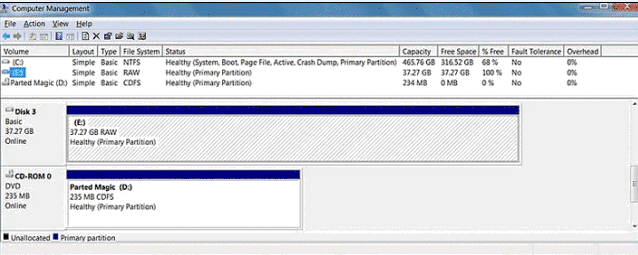
4. The Disk Management says the file system of the partition is RAW or unknown.
Solution for RAW Partition Fix
Whether it is an internal hard drive or external hard drive, pen drive, memory card, flash drive turns to RAW file system, the first thing is to make it clear if there is important data on the RAW drive. If there is important data, you can go to the Solution Step1 to recover data at first. If there is no data on the RAW drive, you can skip to Solution Step 2 to fix the problem directly.
Solution Step 2: Convert RAW to NTFS / FAT32 by reformatting
After recovering all important data or if there is no precious data on the RAW drive, you can format the device which has RAW file system to NTFS or FAT32 file system. The easiest way is to open "My Computer" and right click the RAW drive to format it with NTFS or FAT32 file system.
=>> To get more methods to format a device, please visit: How to format RAW drive to NTFS / FAT32
CHKDSK Is Not Available For RAW Drives Errors
When any digital device such as an internal hard drive or external hard drive, memory card, thumb drive turns to RAW, you may run CHKDSK to check the RAW drive for error fixing. Usually, you can fix the problem successfully by running CHKDSK, but sometimes you may receive the error message: "This type of file system is RAW. CHKDSK is not available for RAW drives".
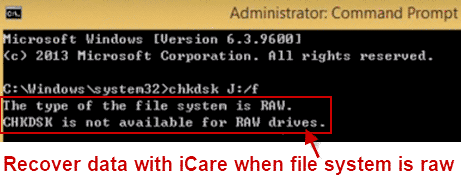 chkdsk is not available for raw drive
==> For more detailed information about the CHKDSK not available problem, please refer to: CHKDSK is not available for RAW drives
Windows Was Unable to Complete the Format on RAW Drive
Since RAW file system is an unknown filesystem for Windows, you may receive another message "Windows was unable to complete the format".
You may download a formatter on CNET host.
http://download.cnet.com/HP-USB-Disk-Storage-Format-Tool/3000-2094_4-10974082.html
Right click the software and then select 'Run as admin' to start the formatting.
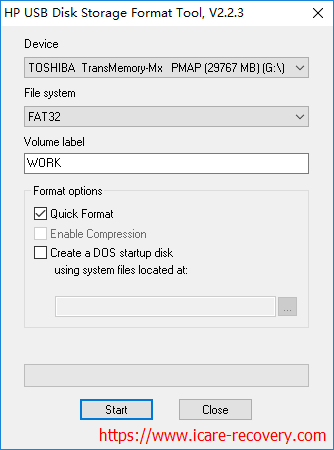
==> See Windows was unable to complete the format
==> See Free USB Format Tool
Causes for RAW Error
RAW error is a problem that might be caused by many reasons, which include:
1. A hard disk drive, portable hard drive or memory card, flash drive would change to RAW format because the format is not completed after you mistakenly format a drive.
2. Remove a removable disk from PC unsafely while it is in use
3. Remove memory card out of digital camera or smartphone without turning off the device
4. Keep saving files to the device when it is nearly full
5. The digital device is attacked by virus
6. Sudden power off while writing or transferring files on the digital device
How to Prevent RAW Problem
1. Whenever you need to remove your storage media from your computer, please remember to remove it safely.
2. Remove memory card like SD, microSD, miniSD, SDHC, SDXC, CF or XD card from mobile phone or digital camera by turning off the device first of all
3. Do not save data downloaded from unsafe website to your hard drive, external hard drive, memory stick or other storage device because it may contain virus that can corrupt the file system of the device.
FAQs
Question: Can Windows read raw?
Answer: Windows is not able to read raw format since it is not a recognized format by Windows. Windows may read file systems such as NTFS FAT32 EXFAT instead of the raw file system.
How to make Windows computer read a raw partition/drive? => Rescue data from the raw drive at first and then format the raw partition to a regular format (ntfs/fat32/exfat) in Windows computer.
Also read: 8 ways to format a disk
Last updated on Nov 28, 2023