SanDisk SD Card Photo Recovery Without Software — How to Recover Photos & Free Tools
Lost photos from a SanDisk SD card? This guide shows what you can try without extra software, and — where manual methods aren’t enough — the best free recovery tools (including iCare Recovery Free). Follow these steps carefully to maximize the chance of a successful recovery.
Can you recover photos from a SanDisk SD card without software?
Short answer: usually no. When files are deleted on an SD card, the file table entries are removed but the actual image data often still exists on the card until overwritten. To find and reconstruct those files you normally need a tool that scans the card sectors and rebuilds image files. Practical and reliable recovery typically requires software that knows how to read the raw data and file signatures on the card.
When manual methods might help
- Check backups: Always check cloud backups (Google Photos, iCloud, Dropbox) and any camera or phone auto-backups first — this is the fastest route to restore photos.
- Try the camera or phone: Reinsert the SD card into the original camera/device and browse its internal gallery. Sometimes the device cache still shows thumbnails or copies.
- Inspect the card reader and ports: If your computer doesn't see the card, try a different card reader or USB port — sometimes the issue is hardware, not deleted files.
- Look for hidden folders: Connect the card and enable hidden/system files in your file manager to check if files are only hidden, not deleted. Details: how to show hidden files on sd card
These manual checks are essential first steps — but if the files are truly deleted, a recovery application is the reliable next move.
How to safely prepare your SanDisk SD card for recovery
Before using any recovery tool, follow these safety rules to improve success rates:
- Stop using the card immediately. Do not take new photos, format, or save files to the card — new writes can overwrite the deleted data.
- Use a read-only connection if possible. Prefer a card reader that supports read-only mode, or create a disk image of the card to work from.
- Work from a separate drive. Install and run recovery software on your computer’s hard drive — never install recovery software to the same SD card you’re trying to recover from.
Free software to recover photos from SanDisk memory card
When manual checks fail, these free tools are commonly used to recover photos from SanDisk SD cards.
1. iCare Recovery Free (GUI, beginner-friendly)
iCare Recovery Free is a free Windows recovery product that advertises the ability to recover photos, videos, and other files from SD cards, USB drives, and internal disks. Its guided interface is suitable for users who prefer step-by-step recovery with a graphical experience. Always download from the official iCare site icare-recovery.com and avoid installing the program onto the target SD card.
Step-by-step: Using iCare Recovery Free to recover photos (basic flow)
Below is a typical, safe workflow when you choose iCare Recovery Free (Windows).
- Remove the SD card from the camera or phone and connect it to your PC with a card reader.
 Download and install iCare Recovery Free on your computer — not on the SD card.
- Launch the program and select a recovery mode (usually “Deleted File Recovery” or “Deep Scan”).
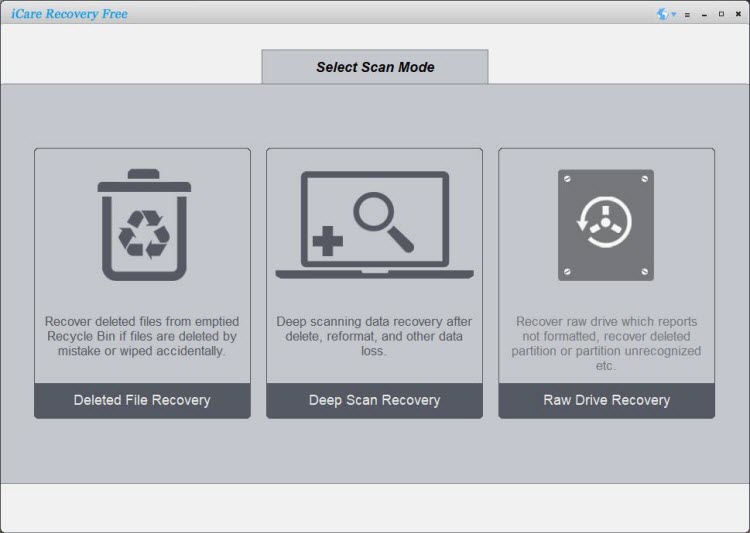
- Scan the SD card — let the program finish the scan; deep scans can take time depending on card size.
- Preview and select recoverable photos, then recover them to a different drive (not the SD card).
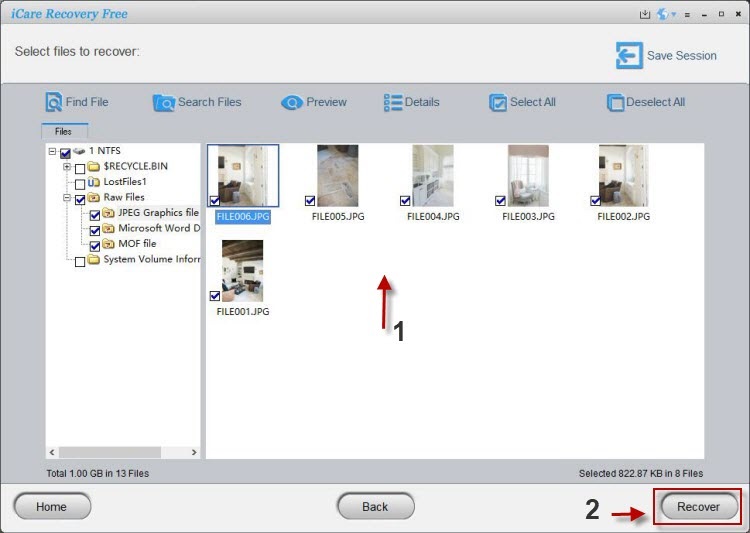
iCare's free version is targeted at Windows users and aims to keep the UX simple for beginners. As with any tool, results depend on how much of the original data remains intact on the card.
Also read: sd card recovery online free, sd card data recovery and Sandisk sd card data recovery
2. Recuva (easy, free Windows tool)
Recuva offers a friendly GUI and is a good first try for Windows users. It’s beginner-friendly and can recover many common image formats from SD cards. The free edition covers typical undelete tasks and is simple to run.
3. PhotoRec (powerful, free, cross-platform)
PhotoRec is an open-source recovery utility that works by carving files from raw disk data. It supports many image formats and can recover files even if the file system is damaged. PhotoRec is powerful but is command-line oriented and can recover files without original names. Ideal for users comfortable with a slightly technical workflow.
4. Disk Drill & others (tryable free tiers)
Disk Drill and a few other tools offer free trials or limited free recovery amounts — useful if you only need to recover a small number of files. If free options don’t recover the images you need, paid tiers may offer deeper scanning and better file reconstruction.
Tips to improve recovery success
- Act quickly: The sooner you attempt recovery the better — fewer writes means higher chance of intact files.
- Create a disk image: If possible, image the SD card and run recovery on the image — that preserves the original media.
- Try multiple tools: Different tools use different techniques; if one tool fails, try another (PhotoRec, Recuva, iCare, Disk Drill).
- Recover to a separate drive: Always save recovered files to a different physical disk.
FAQ
Q: Is it possible to recover photos after formatting an SD card?
A: Often yes — a quick format removes file entries but doesn’t overwrite all data. Use recovery software as soon as possible and avoid using the card. More destructive operations (full/secure format or heavy writes) reduce the chance of success.
Q: Are free recovery tools safe?
A: Many free recovery tools (PhotoRec, Recuva, iCare Free) are broadly used and safe when downloaded from official sites; always scan installers and avoid installing recovery software on the target SD card.
Q: What if my SD card is physically damaged?
A: Software can’t fix physical damage. If the card is physically broken, consider professional data recovery services — they have specialized tools to extract raw storage chips. Professional recovery can be costly but sometimes the only option for badly damaged cards.
Final thoughts
If the images are critical, start by checking backups and trying non-destructive manual checks. If those fail, use trusted recovery software — PhotoRec for powerful, free open-source recovery; Recuva for quick Windows recoveries; and iCare Recovery Free if you want a simple GUI-driven process. Remember: stop using the card, work from a copy or different drive, and try multiple tools if needed. Good luck — many users recover their precious photos successfully by following these steps.
Related Articles