SanDisk Data Recovery Services and Free Recovery Options
Yes, SanDisk offers data recovery services through its partnership with Ontrack, providing both software and in-lab solutions. While SanDisk does not have its own official recovery software, it collaborates with third-party companies like LC Technology for its RescuePRO® software and Ontrack for more complex cases such as physical damage or drive failure situations.
#1: Software-Based Recovery
RescuePRO®
Some SanDisk products come with a free one-year license for SanDisk RescuePRO® software, designed to recover lost files from memory cards such as photos, videos, and documents.
Important clarification: If you received a SanDisk product that originally included a RescuePRO® license, you can use it at no cost for one year. However, if you lose the license or code, or your device did not include one, you will need to purchase a new license from LC Technology to continue using the software.
Download link: https://support-eu.sandisk.com/app/answers/detailweb/a_id/50886/~/download-and-install-rescuepro-data-recovery-software-for-windows (Needs a pay if you have lost the software on your Sandisk device)
Third-Party Free Tools
You can also use other third-party data recovery programs, such as iCare Recovery Free or Recuva, to scan and recover data from SanDisk devices free.
Free Tool: iCare Recovery Free (Windows)
iCare Recovery Free is a completely free data recovery tool that supports SanDisk SD cards, flash drives, and external hard drives. It can help retrieve lost or deleted files caused by accidental deletion, formatting, or system errors.
Steps to Use iCare Recovery Free:
 Download and Install: Visit the official iCare-Recovery.com website and download the iCare Recovery Free version. Install it on your computer.
- Launch the Software: Open the program and connect your SanDisk device (e.g., SD card or USB drive) to the computer.
- Select a Recovery Mode: Choose the appropriate recovery mode, such as “Deleted File Recovery” "Deep Scan Recovery" or “RAW Drive Recovery" for Lost Partition Recovery.
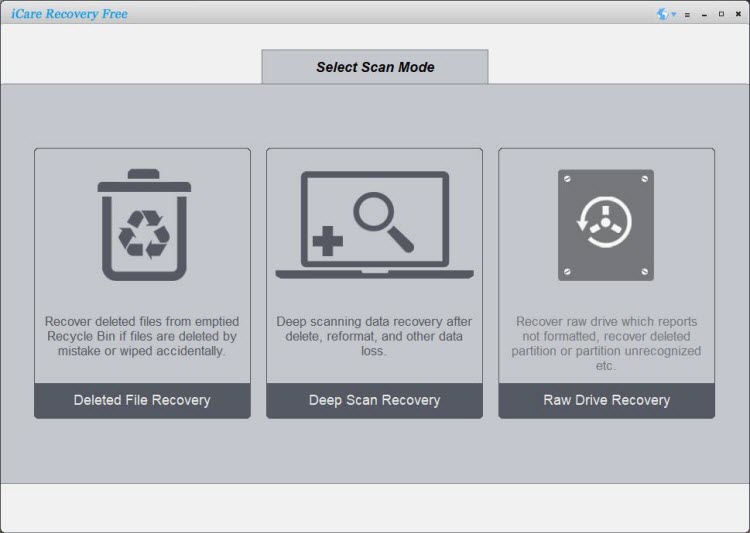
- Scan the Device: Select your SanDisk drive from the list and click “Scan” to begin searching for lost files.
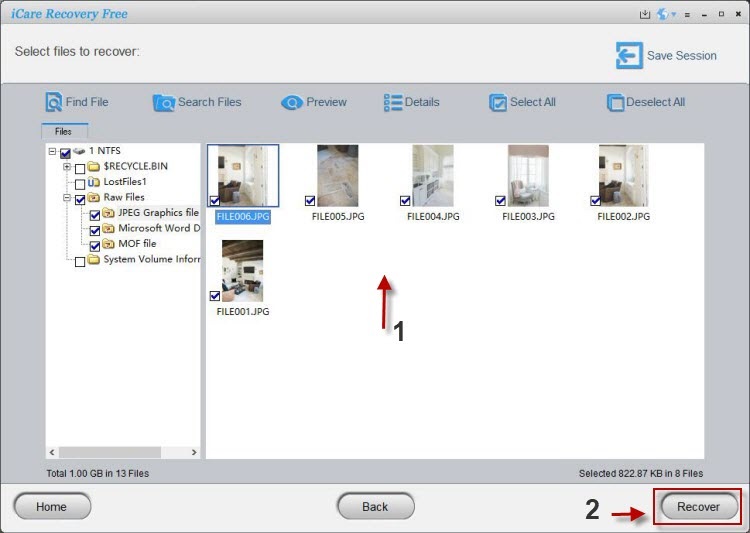
- Preview and Recover: Once the scan completes, preview the recoverable files. Select the ones you need and click “Recover” to save them to a safe location on your computer (not on the same SanDisk drive).
This free option is ideal for basic recovery needs without requiring any paid plan.
Also read: Sandisk recovery software free, Sandisk photo recovery software
#2: Professional Data Recovery Services
Ontrack Partnership
SanDisk partners with Ontrack to provide professional data recovery services for both routine and extreme situations, including physical damage, drive failure, or corrupted file systems.
https://shop.sandisk.com/support/store/warranty-services/data-recovery
Note: The Ontrack service is paid. Pricing depends on the complexity of the recovery and the condition of the device.
What's Included
- One in-lab data recovery attempt
- Shipping costs covered
- Warranty replacement device (in some cases)
Refund Policy
If Ontrack cannot retrieve the data, SanDisk will refund the full price of the recovery plan, ensuring peace of mind for users.
Frequently Asked Questions (FAQ)
Does SanDisk have its own data recovery software?
No, SanDisk does not develop its own data recovery software. Instead, it collaborates with trusted third parties such as LC Technology (for RescuePRO®) and Ontrack (for in-lab recovery).
Is iCare Recovery Free really free?
Yes, iCare Recovery Free provides 100% free recovery for most file types. However, advanced features like deep scanning of damaged drives may require an upgrade.
Is Ontrack a paid service?
Yes. Ontrack is a professional, paid recovery service used for complex or physical drive damage. The price depends on the severity and type of data loss.
Is RescuePRO® free with SanDisk devices?
Yes, many SanDisk devices include a free one-year RescuePRO® license. However, if you lose access to the software or your license key, you will need to purchase a new one from LC Technology.
Which tool should I try first?
If your data loss is simple (like accidental deletion or formatting), try iCare Recovery Free or RescuePRO®. If your drive is physically damaged or inaccessible, contact Ontrack for professional help.
Can I recover data from a corrupted SanDisk SD card?
Yes, tools like iCare Recovery Free and RescuePRO® can often recover data from corrupted or unreadable SanDisk SD cards.