SanDisk Data Recovery Options and Free Recovery Tools
SanDisk offers its own first-party software called RescuePRO® and partners with third-party recovery services for data recovery needs. In addition, many reliable free and paid third-party software options are available to help users recover lost files from SanDisk devices. If you are searching for SanDisk data recovery software download or SanDisk data recovery software for Windows, this guide provides all the best options.
Official SanDisk Options
RescuePRO® and RescuePRO® Deluxe
These are the official file and data recovery software tools that SanDisk recommends and sometimes bundles with its products. They can recover various file types such as photos, videos, documents, and music from flash media devices like SD cards and USB drives.
Note: Support for this software is handled by LC Technology, not SanDisk (Western Digital) directly.
Download link: https://support-eu.sandisk.com/app/answers/detailweb/a_id/50886/~/download-and-install-rescuepro-data-recovery-software-for-windows (Needs a pay if you have lost the software on your Sandisk device)
Clarification: RescuePRO® and RescuePRO® Deluxe are often provided free for one year when included with a SanDisk product. However, if you have lost your activation code, or your license period has expired, you must purchase a new license from LC Technology to continue using the software. You can also download SanDisk data recovery software for Windows or Mac directly from LC Technology’s official site.
Professional Lab Recovery
For cases involving physical damage—for example, if your device is broken, water-damaged, or unreadable by any computer—software cannot help. In these situations, SanDisk partners with Ontrack and Datarecovery.com for professional in-lab recovery services.
Link: https://shop.sandisk.com/support/store/warranty-services/data-recovery
Note: The Ontrack service is paid and is typically used for complex recovery needs or physical media damage. Pricing depends on the device condition and the complexity of the recovery.
Recommended Third-Party Software
If RescuePRO® does not meet your needs or you are looking for free or alternative solutions, several highly-rated third-party programs support SanDisk devices and are compatible with Windows and macOS.
iCare Recovery Free (Completely Free Tool)
iCare Recovery Free is a completely free and trusted SanDisk data recovery software for Windows. It supports SanDisk SD cards, USB flash drives, and external storage devices. The program helps recover deleted, formatted, or lost files caused by system errors, accidental deletion, or corruption.
Steps to Use iCare Recovery Free:
 Download and Install: Download iCare Recovery Free. Install it on your computer.
- Connect Your SanDisk Device: Attach your SD card, flash drive, or external hard drive to your PC.
- Choose a Recovery Mode: Select “Deleted File Recovery” or “Deep Scan Recovery” depending on your data loss scenario.
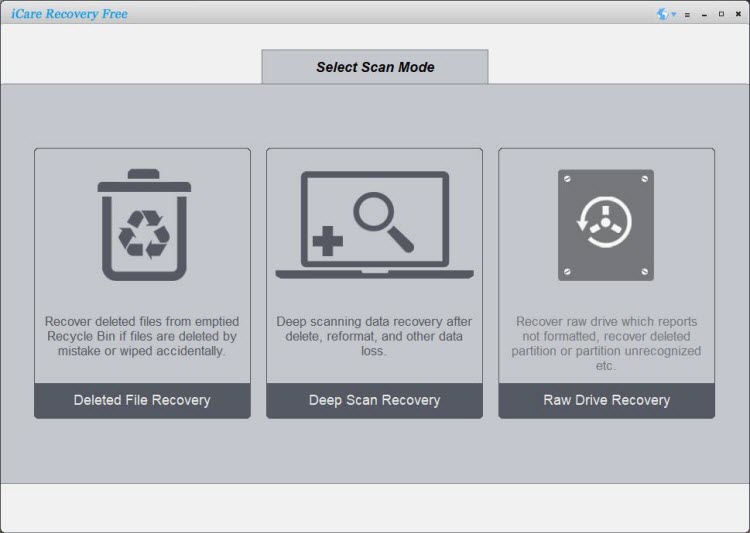
- Scan the Drive: Choose your SanDisk device and click “Scan” to begin searching for lost files.
- Preview and Recover: After scanning, preview the recoverable files and select those you want to restore. Save them to a different storage location.
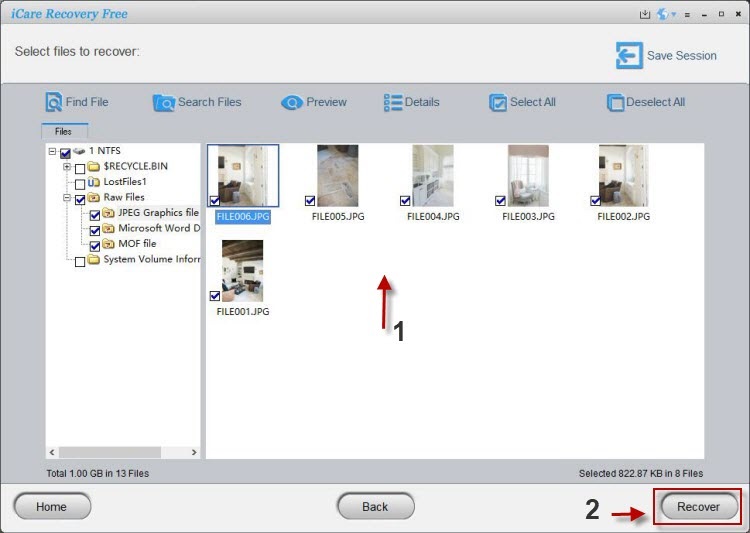
This free software is ideal for anyone needing a simple, reliable, and cost-free way to recover data from SanDisk drives without time or data recovery limits.
Disk Drill (500MB Free Recovery)
Disk Drill is a versatile data recovery software for Windows and Mac. It has a high success rate for recovering RAW photos and videos. The free version allows recovery of up to 500 MB of data on Windows.
EaseUS Data Recovery Wizard (2GB Free Recovery)
EaseUS Data Recovery Wizard is a user-friendly tool that can recover files from multiple data loss scenarios. It offers a free version with a 2 GB recovery limit and works well for SanDisk USBs and SD cards.
Recuva
Recuva is a well-known, Windows-based free data recovery tool with unlimited recovery capability for simple deletions and accidental file losses.
PhotoRec
PhotoRec is a completely free, open-source data recovery program ideal for recovering photos and videos from formatted or corrupted SanDisk devices. It supports Windows, macOS, and Linux systems but has a more technical interface.
Recoverit (Wondershare, Limited Free Recovery)
Recoverit supports over 1,000 file formats and includes a free trial version for recovering a limited amount of data. It is compatible with SanDisk SD cards and external drives.
Also read: Sandisk recovery software free, Sandisk photo recovery software
Tips for Successful Recovery
- Stop using the device immediately: Once data loss occurs, avoid saving or writing new files to the SanDisk device to prevent overwriting lost data.
- Do not format the device: If your computer prompts you to format the drive, cancel it—formatting reduces the likelihood of successful recovery.
- Use a reliable card reader: Ensure a stable connection to your computer by using a high-quality card reader or USB port.
- Download trusted software: Always get your SanDisk data recovery software download from official or reputable sources to avoid malware or corrupted tools.
Frequently Asked Questions (FAQ)
Is iCare Recovery Free really free?
Yes, iCare Recovery Free provides unrestricted file recovery with no data or time limits. It’s one of the best free SanDisk data recovery software for Windows.
Is Ontrack a paid service?
Yes, Ontrack is a professional paid recovery service used when your SanDisk device is physically damaged or severely corrupted beyond software recovery.
Is RescuePRO® included with all SanDisk devices?
No. Only select SanDisk products include a one-year RescuePRO® license. If lost or expired, you can purchase a new license from LC Technology or download the software again via their official site.
Which recovery tool should I use first?
Start with iCare Recovery Free or RescuePRO® for logical recovery (deletion or formatting). If they fail, or if your drive is physically damaged, use Ontrack for professional recovery.