SanDisk Photo Recovery After Formatting — How to Recover Photos from a SanDisk SD Card
Accidentally formatting a SanDisk SD card is a common panic-inducing moment for photographers, parents, and anyone storing irreplaceable photos. The good news is that SanDisk photo recovery after formatting is often possible — especially when you act quickly and use reliable recovery software. This article explains why formatted photos are recoverable, provides a step-by-step recovery guide focused on SanDisk SD cards, introduces iCare Recovery Free as an accessible recovery tool, and offers practical tips and FAQs to maximize your chances of success.
Why photos remain recoverable after formatting
When you format a SanDisk SD card, the device typically rebuilds or clears the file system table (such as FAT32 or exFAT) but does not immediately erase the underlying photo data. The storage areas that held your photos remain on the card until new data overwrites them. Recovery software works by scanning the card at a low level, looking for recognizable file headers and structures (for example, JPEG and RAW file signatures), and reconstructing files even when directory entries are gone.
Key factors that affect recovery success
- Overwrite status: If new photos or videos have been written to the card after formatting, overwritten sectors cannot be recovered.
- Type of format: Quick format typically leaves more recoverable data than a full or secure format that zeroes the card.
- Physical condition: Physically damaged cards may require professional lab recovery.
- File system: Common formats like FAT32 and exFAT are well supported by recovery tools; obscure or encrypted file systems may present challenges.
SanDisk SD card photo recovery after format by mistake — simple step-by-step guide
Follow this straightforward procedure immediately after discovering you formatted your SanDisk card by mistake. The steps minimize further damage and give recovery tools the best chance to rebuild your photos.
Step 1: Stop using the SanDisk SD card
Do not take more photos, attempt to save recovered files to the same card, or format the card again. Each write operation increases the risk of overwriting recoverable data.
Step 2: Use a reliable card reader and connect to your computer
Prefer a direct USB card reader rather than inserting the SD card into a phone or camera. A stable, direct connection reduces the chance of read errors during scanning.
Step 3: Choose recovery software — iCare Recovery Free (recommended starter)
iCare Recovery Free is a free, user-friendly tool suitable for beginners and effective for many formatted card recoveries. It supports common photo formats (JPEG, PNG, RAW variants) and offers quick and deep scanning modes. iCare performs read-only scanning that leaves the card untouched during analysis.
Step 4: Scan the card with iCare Recovery Free
 Download and install iCare Recovery Free on your computer. Do not install the software on the SD card.
- Open the program and select the appropriate recovery mode; choose deep scan for formatted cards or when the quick scan finds nothing.
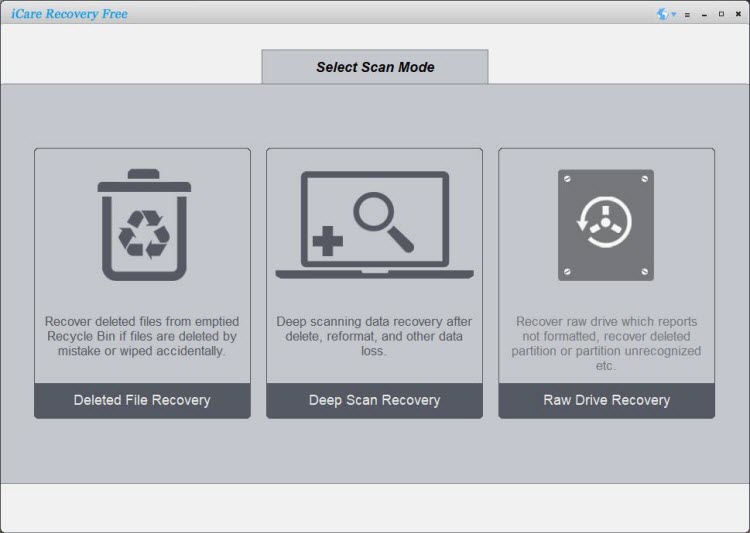
- Choose the SanDisk SD card from the drive list and start the scan.
- Preview found photos and select the ones to recover.
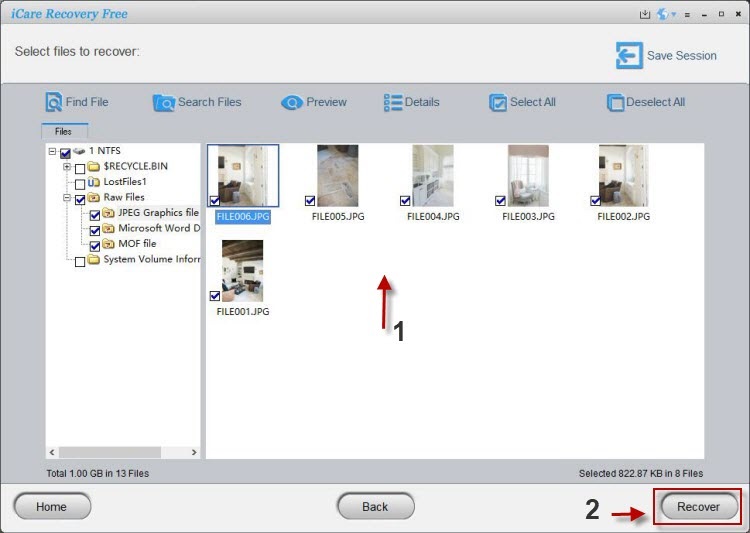
- Save the recovered images to a different drive — never back onto the same SD card.
Also read: Sandisk sd card formatted data recovery, Sandisk recovery software free, sd card formatted photo recovery
Step 5: Verify recovered photos and perform additional scanning if needed
If some images are missing or corrupted, try alternate recovery tools or perform an additional deep scan. Different tools use different signature databases and heuristics, so a second pass with another reputable program can sometimes recover more files.
SanDisk photo recovery after formatting or corruption — strategies for tougher cases
Formatting is a logical data loss event, but corruption can arise from interrupted transfers, virus infections, or file system errors. The best approach for corruption is similar — stop using the card, use a clean reader, and run a deep sector-level scan. In certain cases you may combine logical repair commands with recovery:
- Try read-only file system checks: On Windows, running
chkdskin read-only mode is not recommended for recovery because some repair actions write to the card; instead rely on recovery software first. - Use multiple tools: If photos are fragmented or partially corrupted, try a secondary recovery program after the first scan finishes.
- Repair corrupted images: For partially corrupted JPEGs or video files, specialized repair tools can sometimes reconstruct missing frames or headers after recovery.
Best sandisk sd card format data recovery software — what to look for
Not all recovery tools are equal. When choosing software for sandisk sd card format data recovery, look for these features:
- Read-only scanning: The tool should not write to the SD card during recovery.
- Deep scan and signature-based recovery: Essential for formatted cards and fragmented files.
- Preview capability: Allows you to verify photos before restoring.
- Wide format support: Ability to recover common photo formats and camera RAW types.
- Reliable vendor and safe download: Prefer well-known providers or official vendor sites.
iCare Recovery Free meets many of these criteria and is a good free starting point. Professional tools like Disk Drill, Stellar Photo Recovery, and EaseUS offer advanced features and higher success rates on complex cases but may require a paid license for full recovery.
Troubleshooting and advanced tips
- SD card not recognized: Try a different reader or USB port, check Disk Management (Windows) or Disk Utility (Mac), and avoid initializing or formatting prompts.
- Slow scans: Use a USB 3.0 card reader, close other heavy apps, and be patient — deep scans on large cards can take a while.
- Corrupted previews: If previews are corrupted but files are partially present, use specialized photo repair or raw repair utilities.
- Physical damage: Stop attempting DIY fixes and contact a professional data recovery lab for hardware-level recovery.
Frequently Asked Questions (FAQ)
Can I recover photos from a SanDisk SD card after a quick format?
Yes. A quick format usually leaves the data intact and only removes file system references. Use recovery software promptly and avoid writing anything new to the card.
Will recovery software damage my SanDisk card?
No. Reputable recovery tools perform read-only scans. Always download software from official sites and avoid utilities that claim to “fix” the card by rewriting data unless recommended by professionals.
How long does photo recovery take?
Scan time depends on card capacity, connection speed, and chosen scan depth. Expect from a few minutes for small cards on quick scans to several hours for large cards with deep scans.
What if iCare Recovery Free doesn't find my photos?
Try a different recovery program with strong signature detection. Also perform a deep scan mode. If the card has been overwritten or physically damaged, data may be unrecoverable or require a professional lab.
Conclusion
If you need SanDisk photo recovery after formatting, acting quickly and choosing the right tools are the two most important steps. Start with a free, read-only scanner like iCare Recovery Free to attempt recovery, and escalate to more advanced commercial tools or professional services for complicated or physically damaged cards. Remember: do not write new data to the card, use a reliable card reader, and save recovered photos to a separate drive.