View Hidden Files on SD Card Mac — Unhide & Recover Files
Sometimes SD card files disappear when viewed on a Mac. They might not be deleted but simply hidden. This guide explains how to view hidden files on your SD card using Mac, along with tips to recover files using iCare Recovery Free (Windows) if they remain inaccessible.
Why SD Card Files Are Hidden on Mac
Common reasons files are hidden on Mac include:
- System or dot-files: Files beginning with a period (.) are hidden by default in macOS.
- Corrupted directories: Unexpected ejection or power loss can hide files.
- Malware: Though rare on Mac, some malware can hide SD card content.
- Accidental hide: Files or folders manually marked as hidden.
Knowing the cause helps decide the correct method to reveal them.
Method 1: Show Hidden Files Using Finder
Finder has a simple shortcut to toggle hidden files:
- Insert the SD card into your Mac.
- Open Finder and navigate to the SD card.
- Press Command + Shift + . (dot) to show hidden files.
- Hidden files will now be visible; press the same shortcut again to hide them.
Method 2: Using Terminal to Reveal Hidden Files
If you prefer using Terminal or need a permanent solution:
- Open Terminal.
- Type the following command and press Enter:
defaults write com.apple.finder AppleShowAllFiles YES
- Restart Finder by typing:
killall Finder
All hidden files on the SD card will now be displayed. To hide them again, replace YES with NO in the command.
When Hidden Files Are Still Missing
If files don’t appear after these steps, your SD card may be corrupted, or the files may have been accidentally deleted. Using a recovery tool like iCare Recovery Free (Windows) can help restore them safely.
Recover SD Card Files Using iCare Recovery Free on Windows PC
Follow these steps:
- Remove the SD card from your Mac and insert it into a Windows PC with a card reader.
 Download and install iCare Recovery Free on the PC.
- Launch the program and select the SD card drive.
- Choose Deleted File Recovery or Deep Scan mode.
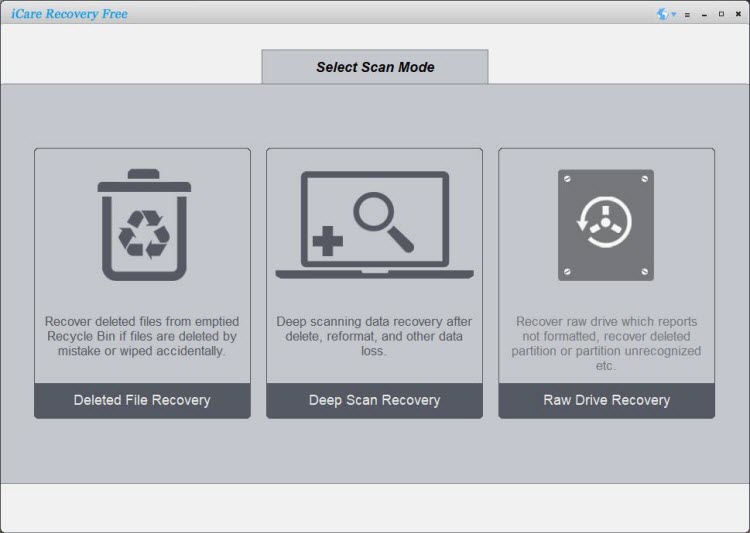
- Preview and select files to recover.
- Save recovered files to a folder on your PC (not back to the SD card).
iCare Recovery Free supports a wide range of file types and SD card brands including SanDisk, Samsung, and Kingston.
Recover files from an SD card on macOS (TestDisk / PhotoRec)
Prerequisites
Stop using the SD card immediately to avoid overwriting deleted data. Use a separate destination drive on your Mac to store recovered files.
Install TestDisk (recommended)
If you use Homebrew, install TestDisk with:
brew install testdiskOr download the official package from the TestDisk website and follow its instructions.
Identify and unmount the SD card
Insert the SD card and run the macOS disk tool to find its identifier:
diskutil listReplace /dev/diskX with the correct identifier and unmount the card (do not eject):
diskutil unmountDisk /dev/diskXRun TestDisk to recover partitions or files
Start TestDisk with administrator privileges and follow the interactive menus:
sudo testdisk- Select your SD card and the detected partition type.
- Choose Analyse to find missing partitions or Advanced > Undelete to recover deleted files.
- Browse recovered files and press C to copy them to a destination on your Mac (not the SD card).
Run PhotoRec for file-based (deep) recovery
If you want to recover many file types regardless of filenames or folders, use PhotoRec (bundled with TestDisk):
sudo photorec- Select the SD card and partition.
- Choose the file types to recover and a destination folder on your Mac.
Optional — clone the SD card first (recommended for failing cards)
Create an image of the SD card and run recovery on the image file instead:
sudo dd if=/dev/diskX of=~/Desktop/sdcard_backup.img bs=4mThen run TestDisk or PhotoRec on the image file instead of the physical SD card.
Important recovery tips
- Always recover to a different drive than the SD card.
- Do not format or write to the SD card before attempting recovery.
- If the card is physically failing, cloning to an image first increases chances of success.
- PhotoRec recovers file contents but may not preserve filenames or folder structure.
Also read: sd card recovery software for mac
If you prefer a GUI
There are graphical recovery tools available for macOS (some with limited free options). Verify the developer’s reputation before downloading any software.
Tips to Prevent Hidden File Issues on Mac
- Always safely eject the SD card from your Mac.
- Keep backups in iCloud or another cloud service.
- Scan for malware periodically, especially on shared drives.
- Do not manually hide system files unless necessary.
FAQ
How do I unhide files on an SD card Mac?
Use Command + Shift + . in Finder or use Terminal to show all hidden files.
Can I recover files if they are deleted on Mac?
Yes. Although iCare Recovery Free is Windows software, you can insert your SD card into a Windows PC to recover deleted or hidden files safely.
Is it safe to use iCare Recovery Free?
Yes. It is a read-only tool, so your SD card data is not modified during scanning or recovery. Always download from the official iCare Recovery website.
Conclusion
Hidden files on Mac SD cards can often be revealed with Finder or Terminal commands. For corrupted or accidentally deleted files, iCare Recovery Free (Windows) provides a safe and effective recovery method. Always backup your SD card regularly and safely eject it to avoid hidden file problems in the future.