How to recover deleted files from external/portable/usb hard drive after formatting? This is a tutorial to recover data from formatted external hard disk drive with free hdd format recovery software iCare Data Recovery Pro.
Background
Hello, how to recover data from wrongly formatted external hard drive of 1TB ? Is it possible to recover files after formatting external usb drive? The formatting was done by mistake during using another tool. Can I get the files back?
Does formatting wiped out data on hard drive
Formatting would do the magic of removing the data from users' sight, however it does not really erase every byte of data on the hard drive. The inside data can be restored with the help of a professional utility.
The data would only be removed permanently when new data has taken the place of the old files that under such case, some files would be corrupted after recovery due to radome arrangment of data saving on disc blocks.
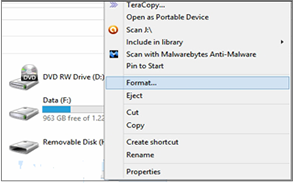
Guide line
In this article you may find the following solutions after external/internal hd was formatted by mistake or even intented:
Already reformatted - Accidentally formatted external hard drive by mistake
1. How to recover
deleted files from external hard drive after formatting? -> Use format recovery
software iCare Recovery Pro.
2. Can you restore formatted portable hard drive with CMD(command line/prompt)? -> no
format recovery command prompt is available for repairing/fixing formatted disk drive.
How to Recover Formatted Data from External Hard Drive
Formatted disk drive recovery software download

Download iCare Data Recovery Pro to restore external hard drive after accidentally formatting so as to get back everything you need including photos, videos, music...
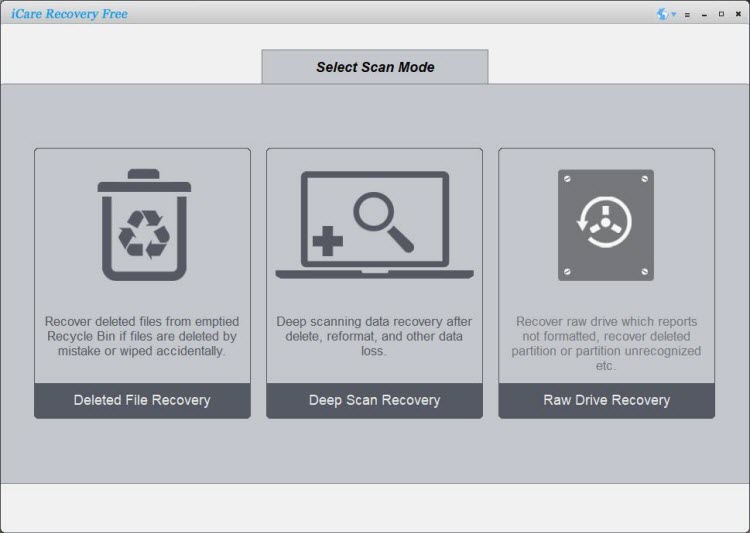
Step1. Download iCare Data Recovery Pro. Install and run the program. And you will see a screen with many options of recovery. Go to Deep Scan Recovery.
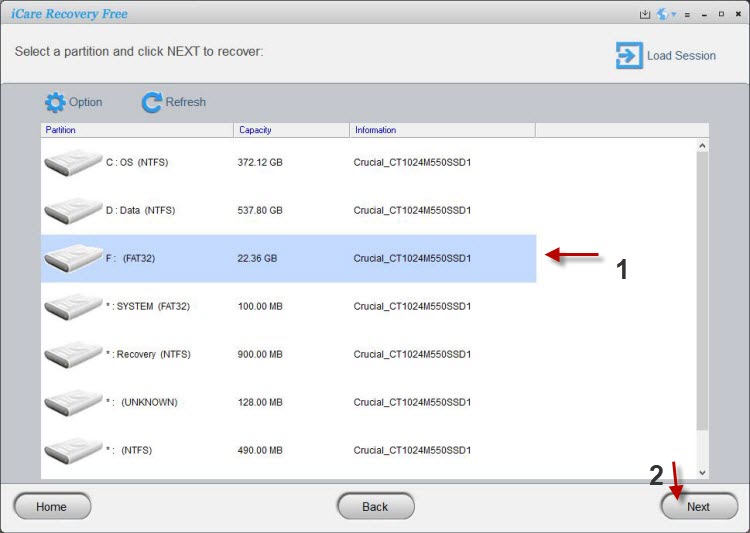
Step2. Select the formatted external HDD and wait the program to search
lost data on formatted disk.
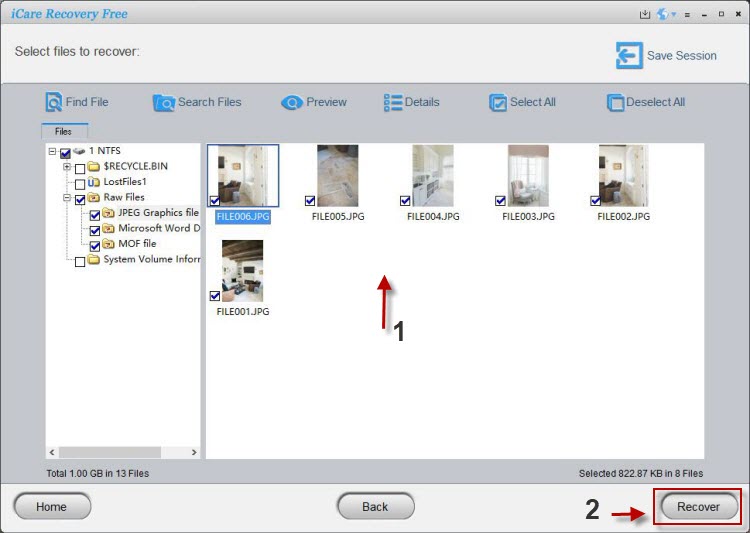
Step3. Double click photos and documents to preview. Then, select all kinds
of files in batch to recover.
Formatting usually erases everything on your external hard drive, but it does not mean that the data was lost permanently. As long as the external HDD is not physically damaged and the data is not overwritten by new data, you can use iCare Data Recovery Pro to recover what you need from the formatted external drive.
>> Download the data recovery software and use it to deep scan the external hard drive for data recovery after formatting.
Users' Case Study
Case 1 - low level formatting recovery
I low level formatted a Seagate usb disk after I've confirmed that it has bad sectors, so I did a low level format hoping that this could bring the disk back to life again. The format tool was a one made by HDDGURU which I formatted it to be ntfs after Windows failed to complete the format.
And after the formatting I suddenly recollected that there were some work files that I forgot to move it out before the formatting, now I want to know whether I could get formatted data off the low level formatted disk?
Resolution:
No way of data recovery after the low-level formatting. The low-level formatting is always risky, data permanently erasing and there is no way for software to restore the formatted data. The only hope is expensive local data recovery service center in a 100% dust-free clean enviroment and the price would be above $500-2000 and over the price.
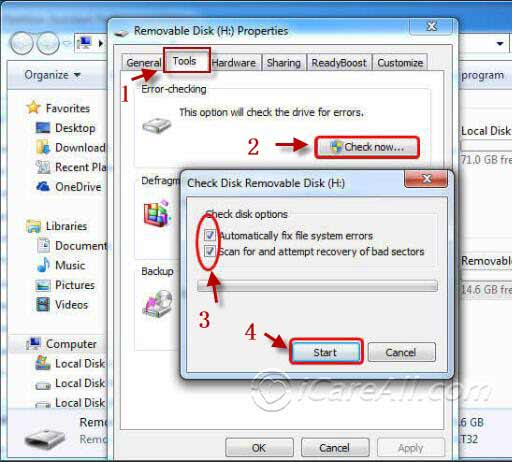
You should always avoid performing a low-level formatting, which would permanently erase inside data together with shortening the life of your device. We would recommend you use Error-Checking to repair bad blocks on your disk.
How to repair damaged blocks on hard drive for free
1. Right click the media on your PC and then find 'Property'.
2. Click 'Check' under the menu of 'Tools' and confirm selecting automatically fix file system errors and scan for and attempt recovery of bad sectors.
Case 1 - formatted usb disk a long time ago
My usb hard disk drive warned me to format it and I accidentally clicked yes since it wont let me use it if I ignore the warning, and then I saved data onto the formatted usb for several months but just some hundreds of photos onto the disk as for backup of the photographies.
Then one day, I just wonder whether can I still get the old formatted data back after such a long time.
Resolution:
Can we still recover data from the formatted hard drive that was formatted some time ago and has already saved data onto the disk?
It is much more complicated in this case, usually if data were constantly saved onto the disk, it can be recovered almost 99% of good copies. However if data were overwritten by new data, then some part of overwritten files could be corrupted. The chance of successful recovery would be about 30%-70% depending on how much new data made the lost data corrupted. You may still have some chance but the results cannot be ensured.
You should stop using the device once it got formatted by mistake or once it forced you a format to keep the best chance of recovery.
Different brand/capacity of Portable/internal hdd format recovery
iCare Data Recovery supports all types of external hard drive brands like Toshiba, Iomega Prestige, Western Digital, Maxtor hard disk, Seagate, etc.
Hot Articles