Corrupted Hard Disk Data Recovery
Background
I have a disk using for backup for years. It is a seagate external hard drive of 2TB. It suddenly crashed and corrupted without reason. I used it for a data backup of many family photos videos together with thousands of important documents of my work files. Now I am barely going blank about it, can anybody tell me how to recover data from the crashed hard drive and is it possible to repair the corrupted disk?
We have met many users of hard drive no matter internal disk or portable usb disk that go abnormal after some time and need a recovery. Now this article would tell you the following parts to help you perform crashed disk recovery.
Table of contents
Most common hard drive failure
How you will come to know that your hard disk has crashed? The most common disk failure for crashed disk may happen as follows
- Hard drive cannot be recognized by PC (logical damage or physical damage)
- Hard drive suddenly became raw with unsupported file system - logical damage
- Hard drive has ticking noise, light is blinking but wont show up in PC - physical failure
- Hard disk capacity became 0 bytes - logical damage
- Bios failed to detect hard drive - physical failure
- Boot failure on hard drive/PC or "disk boot failure" "operating system not found"
- In some situations a blue screen of death on Windows start up shows that your hard disk has crashed.
- Installed operating system like Windows 10 on a wrong partition - logical damage but data partially overwritten
- Hard disk uninitialized i/o error - logical damage
- Serious physical damage can only be repaired by local service for eg. water into the disk, disc broken, disk internal part damage
Recover damaged hard disk
Physical damage: beyond recovery or can only be recovered by local recovery service
Whenever you hear some noise of ticking or scratching out of your hard disk, this shows that there is some problem with the physical part of the hard disk. Or the labled physical damage of hard drive shall only be turned to a local data recovery repair center to get your disk open in a 100% clean of enviroments.
The price of physical damage usually takes from US$200 to US$1000.00 depending on your local recovery service company.
Logical failure: can be mostly repaired by software
If you cannot open your disk due to logical errors like raw file system, disk asks formatting, uninitialized, io device error, formatted disk by mistake, deleted files by error, hard disk will not be detected by the BIOS and BIOS can not access your hard disk... your data can be mostly be recovered.
Freeware to Recover Files from crash hard disk
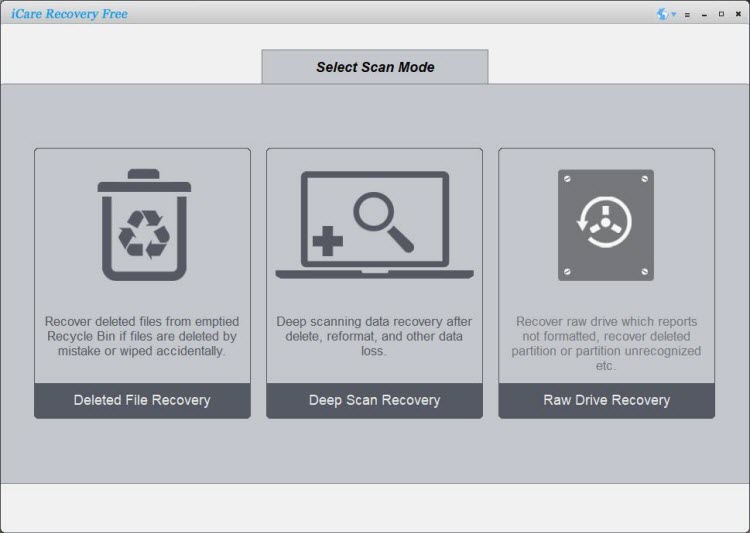
Step One: Free download the iCare Data Recovery, install and start the software. Select file types to search lost files.
Step Two: Select the hard disk to perform a scan. and wait when scanning process is on progress.
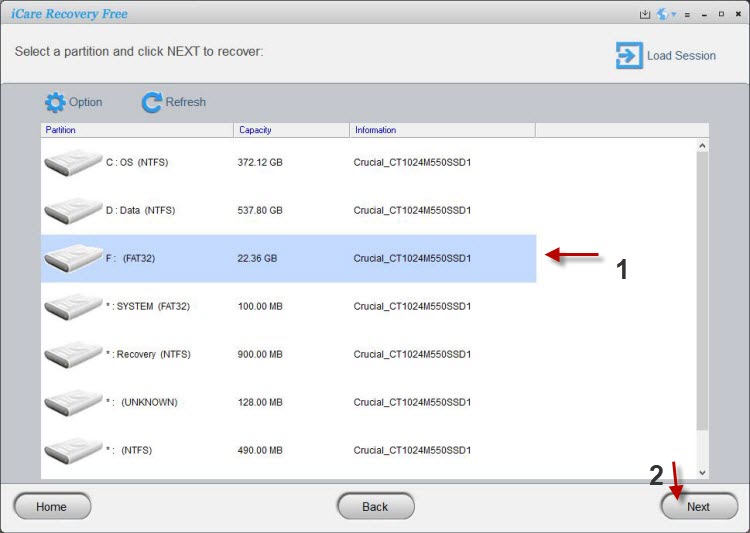 Recover data from damaged disk
Step Three: Select and save the files you need.
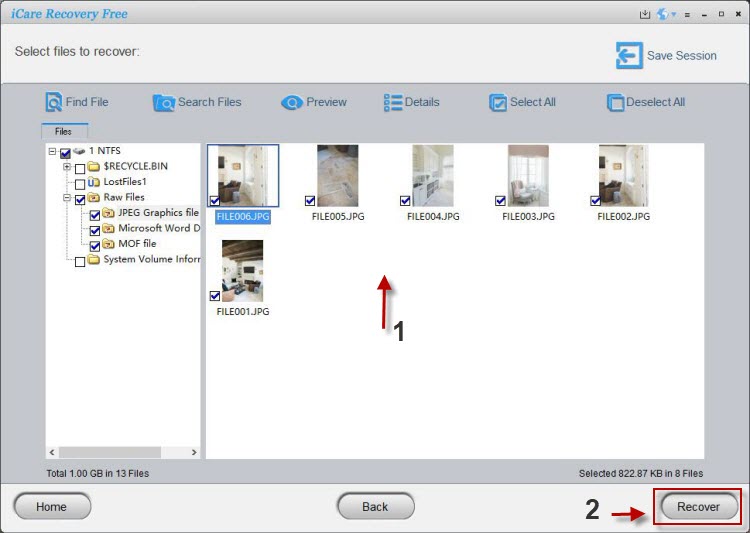 Recover data from damaged disk
Video Tutorial: how to recover corrupted hard disk
Also read: 8 free ways to fix corrupted hd
If the hard disk is physically damaged, it is usually impossible to get back the lost files. However, you can use iCare Data Recovery to restore data from a crashed hard disk when it is corrupted due to virus infection, bad sectors or other similar reasons. Please stop trying any further operation to fix the hard disk before running iCare Data Recovery for lost file recovery from the crashed hard disk.
Last updated on Nov 28, 2023
Related Articles
- SCSI hard drive file recovery - SCSi is a type of interface of hard disk drive. This page would tell how to recover data off a SCSI hard disk.
- Fix failed hard disk - fix hard disk drive when it is failed and cannot function normally.
- Mistakenly delete partition from computer - Data recovery from deleted partition for desktop or laptop.
- WD my passport external does not work - My WD external hard drive is corrupted because it cannot be used to save to write data.
Hot Articles
- File recovery from formatted card - For any mistake that causes memory card file loss, you have chance to rescue what you need.
- SD card has unsupported format error - You ca fix an SD card that has unrecognized error within two steps without losing anything..